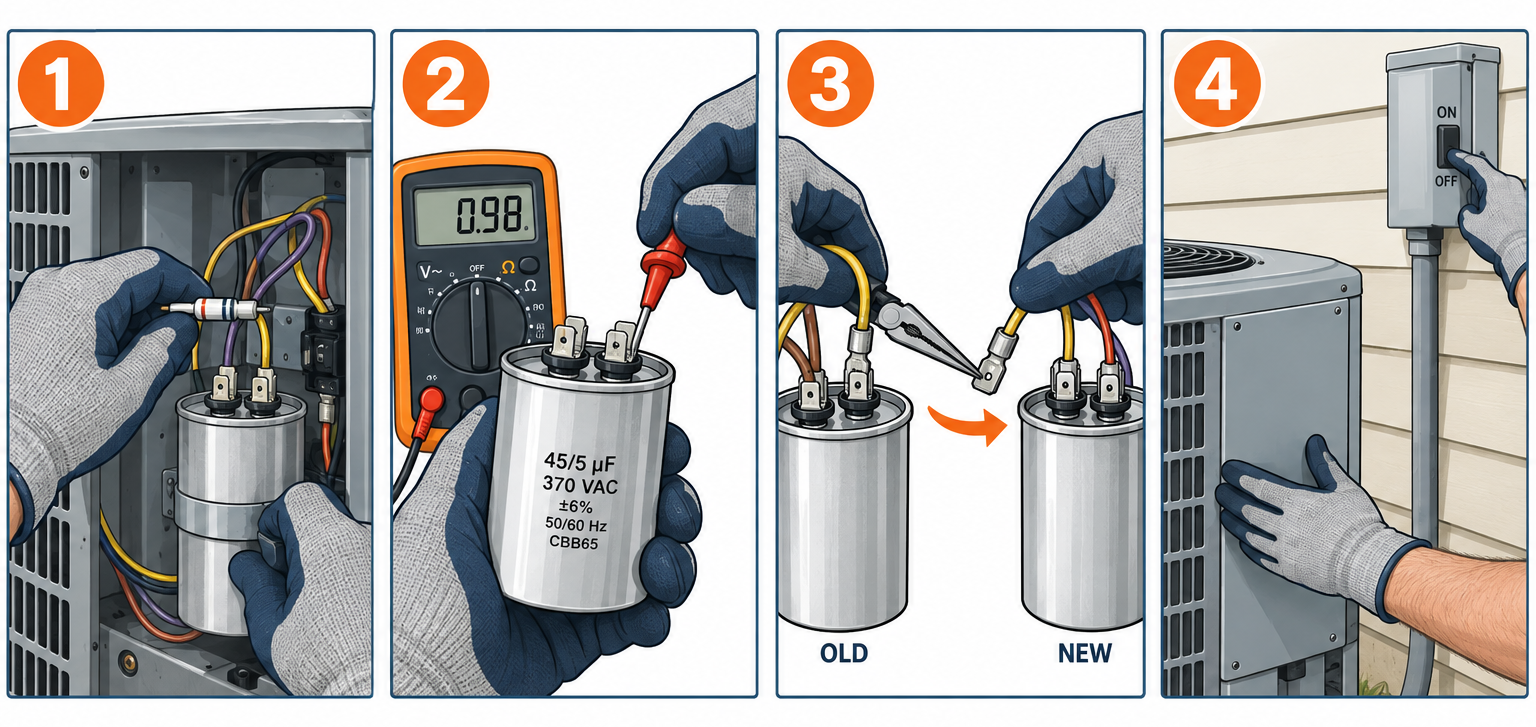
AC capacitor replacement is one of the cheapest and most common air conditioner repairs. You shut off power at the outdoor disconnect, discharge the old capacitor, move each wire to the matching terminal on a new capacitor with the same microfarad rating and an equal or higher voltage rating, and restore power. The part usually costs $15 to $50 and the work takes 30 to 60 minutes. A service call for the same job typically runs $80 to $400, with most homeowners paying $150 to $250.
Quick steps: replace an AC capacitor
- Confirm the symptoms point to the capacitor (humming, fan not spinning, bulged top).
- Pull the outdoor disconnect and switch off the AC breaker at the panel.
- Remove the service panel and photograph every wire on the capacitor.
- Discharge the capacitor with a resistor or insulated tool, then verify zero volts.
- Read the label (µF and VAC) and test the old capacitor with a multimeter.
- Move wires one at a time to the same terminals on the new capacitor.
- Strap the new capacitor in place, close up, restore power and confirm the system cools.
Tools and materials
- Replacement capacitor matching the old µF rating exactly, voltage equal or higher (370 or 440 VAC)
- Digital multimeter with a capacitance (µF) setting
- Non-contact voltage tester
- 20,000-ohm, 5-watt resistor with insulated alligator leads, or a capacitor discharge tool
- Insulated screwdrivers (Phillips and flat)
- 1/4-inch and 5/16-inch nut drivers for panel screws and the mounting strap
- Needle-nose pliers for pulling spade connectors
- Phone camera and masking tape with a marker for labeling wires
- Safety glasses and insulated gloves rated for electrical work
Calculators for this job
Safety first
Turn off both the outdoor disconnect and the AC breaker, then confirm zero volts at the contactor before you touch anything. A capacitor can hold a dangerous charge for a long time after the power is off, so always discharge it and verify with your meter before handling it.
Step 1: Confirm the Capacitor Is the Likely Problem
Before you buy anything, make sure the symptoms match. A run capacitor gives the compressor and the condenser fan motor the extra electrical push they need to start and then keeps them running efficiently. When it weakens or fails, the motors can’t start on their own, or they start slowly and run hot.
The classic signs of a bad AC capacitor:
- Humming outdoor unit with no fan movement. The contactor pulls in, the motors get power, but they can’t turn over. You hear a steady hum or buzz from the condenser.
- Fan not spinning while the compressor runs (or the reverse). A dual run capacitor serves both motors, and either half can fail independently.
- Indoor blower running but blowing warm air. The thermostat calls for cooling, the indoor air handler works, and the outdoor unit isn’t doing its share.
- Clicking, then silence. The compressor tries to start, overheats, and trips its internal thermal overload. It may try again 15 to 30 minutes later.
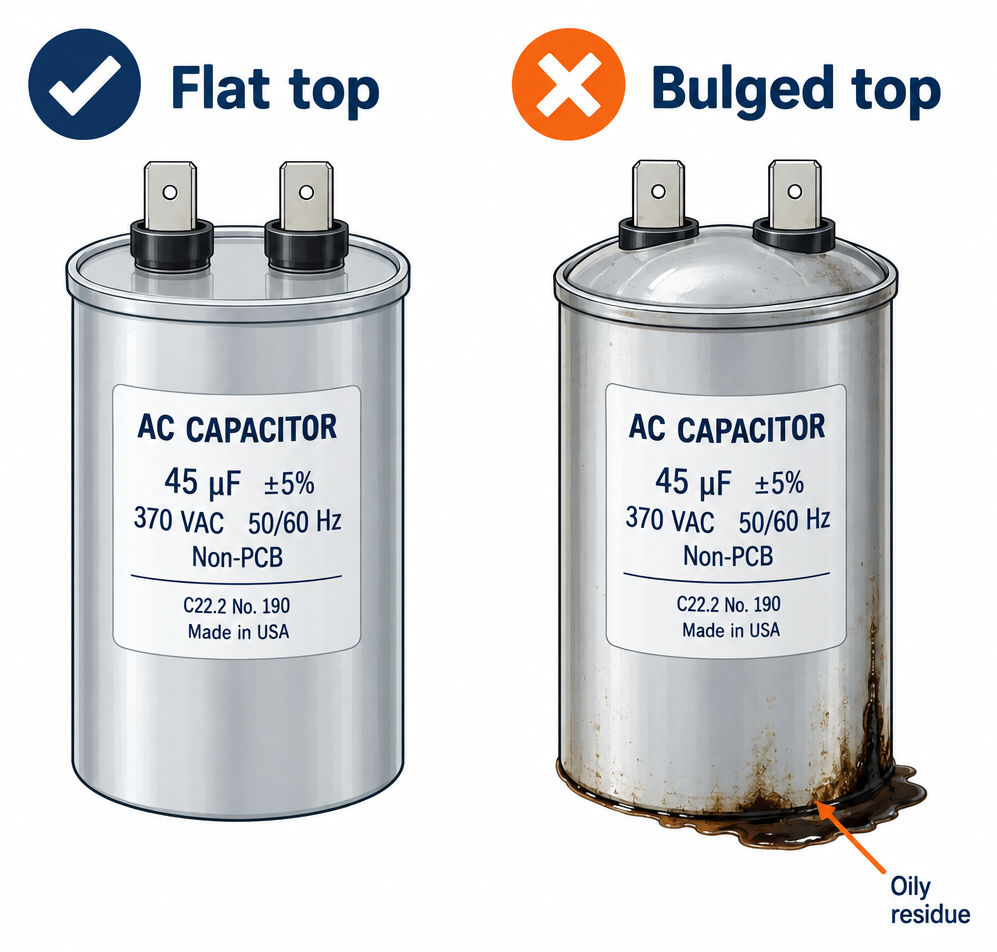
- Visible damage. A domed or bulging top, a split case, or oily residue on the capacitor body or the bottom of the unit. A healthy capacitor has a flat top.
- Unit that won’t start on hot afternoons but runs fine in the morning. Heat accelerates capacitor wear, and a marginal capacitor often fails first when outdoor temperatures peak.
If your system isn’t running at all and the outdoor unit is completely silent, the capacitor may not be the cause. A tripped breaker, a blown fuse in the disconnect, a failed contactor, a thermostat problem or a float switch on a clogged condensate line can all stop the unit cold. Our guide on how to fix an air conditioner that isn’t working covers those checks in order.
One thing you’ll see recommended online: pushing a stalled fan blade with a stick to get it spinning. It does confirm a weak fan capacitor, but you’re putting a stick into a 240-volt unit with a blade that can suddenly spin up to over 1,000 RPM. Skip it. A meter test is safer and gives you a real number.
Step 2: Shut Off Power at the Disconnect and the Panel
Your outdoor condenser runs on 240 volts, which is twice the voltage of a standard household outlet. You need two layers of shutoff.
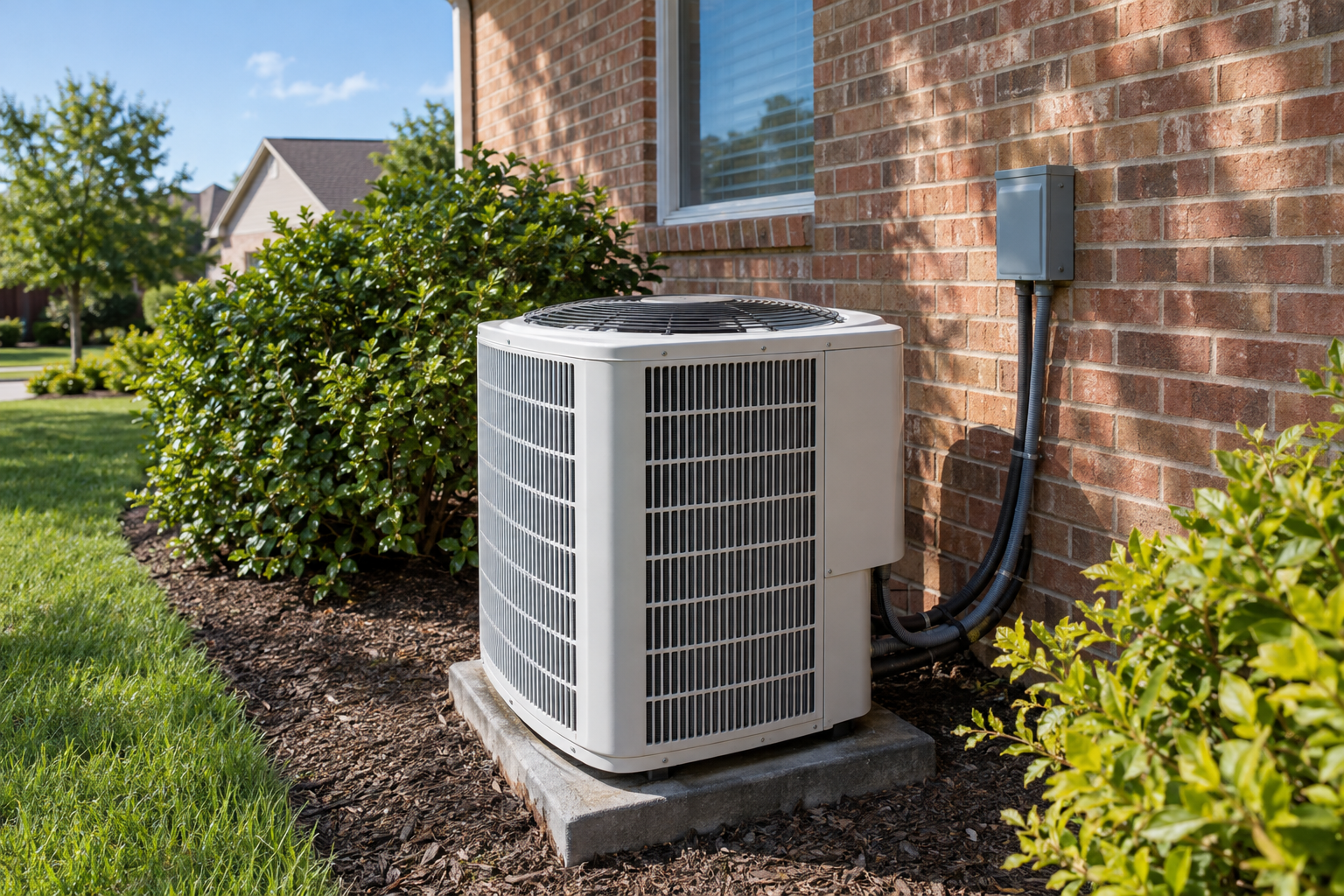
First, find the disconnect box, a small gray metal box mounted on the wall within sight of the condenser. Open the cover. You’ll find one of three types:
- Pull-out block. A plastic handle you grip and pull straight out. Some contain cartridge fuses. Set it somewhere dry where nobody will reinsert it.
- Breaker-style disconnect. Flip the breaker to OFF.
- Lever disconnect. Throw the lever to OFF.
Second, go to your main electrical panel and switch off the double-pole breaker labeled for the AC or condenser. It’s usually 30 to 50 amps. If your panel labels are vague, switch off anything that might be the AC and tape a note over the breakers so nobody flips them back.
Set the thermostat to OFF as well. That prevents a low-voltage call for cooling from energizing the contactor coil when power comes back during testing.
Step 3: Open the Unit and Photograph the Wiring
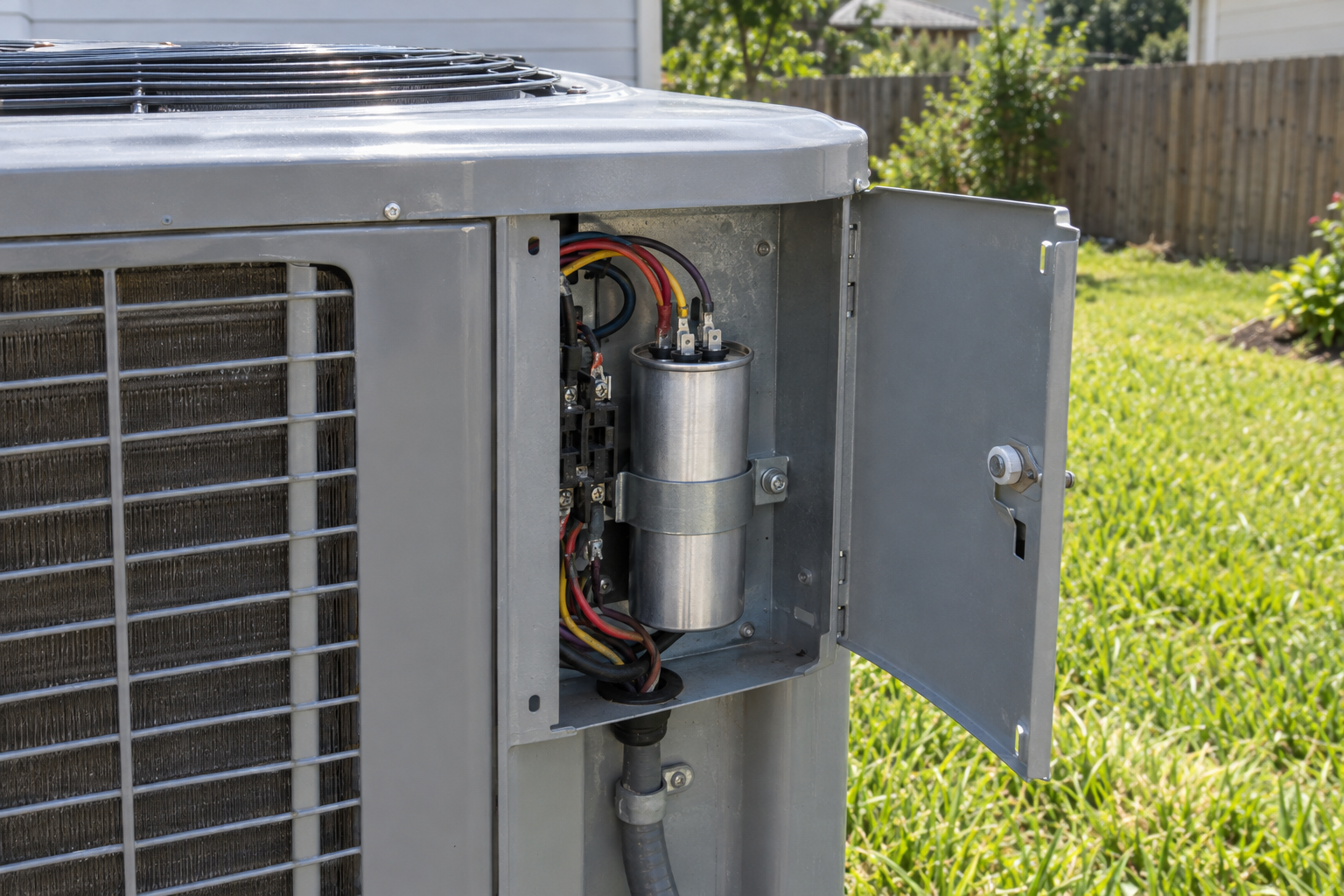
The capacitor lives behind the service panel, usually a small rectangular metal cover on the corner of the condenser where the refrigerant lines and electrical conduit enter. Remove the screws with a 1/4-inch or 5/16-inch nut driver and lift the panel off. Some panels hook at the top and need to slide down before they come free.
Inside you’ll see the contactor (a block with heavy wires and a plunger in the middle), the capacitor (a metal cylinder or oval can, typically 2 to 2.5 inches across and 3.5 to 5 inches tall), and a bundle of wires connecting them.
Now verify the power is truly off. Hold the non-contact tester against the heavy wires entering the contactor on the line side (usually marked L1 and L2). Then set your multimeter to AC volts and measure across L1 and L2. You want 0 volts. If you read 240, or anything above a few volts, stop and recheck the disconnect and breaker.
Take two or three clear photos of the capacitor from different angles before you touch it. You want every terminal label and every wire color visible.
Pro tip
Wrap a strip of masking tape on each wire and write the terminal name on it (HERM, FAN, C) before you disconnect anything. Photos get blurry and wire colors vary between brands, but a written label on the wire itself never lies.
Step 4: Discharge the Capacitor
A capacitor stores energy much like a battery does, except it releases that energy almost instantly instead of over hours. A fully charged run capacitor can deliver a painful shock even with the system off. Many capacitors have internal bleed resistors that drain the charge over time, but those resistors fail, and you can’t tell by looking.
Discharging takes about a minute.
Best method: a resistor. Clip a 20,000-ohm, 5-watt resistor with insulated leads across the terminals. Hold it across HERM and C for 5 to 10 seconds, then FAN and C, then HERM and FAN. The resistor drains the charge in a controlled way without sparks. Dedicated capacitor discharge tools work the same way and cost $10 to $20.
Common method: an insulated screwdriver. Many techs lay the shaft of an insulated screwdriver across the terminals while holding only the insulated handle. It works, but a charged capacitor will throw a loud spark that can pit the terminals and startle you into dropping the tool. If you use this method, wear safety glasses and keep your other hand away from the unit.
Verify it worked. Set your multimeter to DC volts and measure across each terminal pair. You want a reading near zero. Then switch to AC volts and check again. Only now is it safe to touch the terminals.
Don’t skip the verification step. It takes 20 seconds and it’s the difference between a routine repair and a trip to urgent care.
Step 5: Read the Label and Test the Old Capacitor
With the capacitor safe to handle, read everything printed on its side. You need these numbers to buy the correct replacement, and you need a meter reading to confirm it’s actually bad.
Reading the label
A typical dual run capacitor label looks something like this: 45+5 µF ±6% 370 VAC 50/60 Hz. Here’s what each part means.
| Label item | Example | What your replacement needs |
|---|---|---|
| Capacitance (µF or MFD) | 45+5 µF | Exact match on both values: 45 for the compressor, 5 for the fan |
| Tolerance | ±6% or ±5% | Any standard tolerance is fine |
| Voltage rating | 370 VAC | Equal or higher. A 440 VAC part can replace a 370 VAC part, never the reverse |
| Frequency | 50/60 Hz | 60 Hz rated (US power) |
| Terminals | HERM, FAN, C | Same configuration, or two single capacitors wired correctly |
| Shape and size | Round, 2.5 in diameter | Any shape that fits the mounting strap and clears the panel |
| Temperature rating | -40°C to +70°C | Equal or wider range |
µF and MFD both mean microfarads. Older capacitors sometimes say MFD; newer ones usually say µF. They’re the same unit.
Testing with a multimeter
Set your multimeter to capacitance mode (the symbol looks like two parallel lines, or the meter shows µF or nF). Check that your meter’s range covers the value you’re measuring. Some cheaper meters top out below 60 µF.
Disconnect all wires from the capacitor first, because connected motor windings throw off the reading. Then:
- Place one probe on C and the other on HERM. Wait for the reading to settle, usually 2 to 10 seconds.
- Place one probe on C and the other on FAN. Record that reading too.
- Compare each reading to the rated value and its tolerance.
A reading below the tolerance range means the capacitor is weak and should be replaced. A reading of zero or “OL” means it’s open (dead). A reading far above the rating, or a dead short, also means it’s bad.
Here’s the acceptable range for common ratings at ±6% tolerance, which is the most common spec printed on residential run capacitors.
| Rated value | Minimum acceptable (±6%) | Maximum acceptable (±6%) |
|---|---|---|
| 5 µF (fan) | 4.70 µF | 5.30 µF |
| 7.5 µF (fan) | 7.05 µF | 7.95 µF |
| 10 µF (fan) | 9.40 µF | 10.60 µF |
| 35 µF (compressor) | 32.90 µF | 37.10 µF |
| 40 µF (compressor) | 37.60 µF | 42.40 µF |
| 45 µF (compressor) | 42.30 µF | 47.70 µF |
| 50 µF (compressor) | 47.00 µF | 53.00 µF |
| 55 µF (compressor) | 51.70 µF | 58.30 µF |
| 60 µF (compressor) | 56.40 µF | 63.60 µF |
If your capacitor says ±5%, tighten the range slightly. A 45 µF part at ±5% should read between 42.75 and 47.25 µF.
A capacitor reading just inside tolerance (say 42.5 on a 45 µF part) will probably pass today and fail within a season. If you’ve already got the unit open and the part is cheap, replacing a borderline capacitor is reasonable preventive work.
The under-load test pros use
HVAC technicians often test capacitors while the system runs, using a clamp meter. They measure the amps on the wire running from the capacitor to the motor and the voltage across the capacitor terminals, then calculate: µF = (amps × 2,652) ÷ volts. That formula works for 60 Hz power. It catches capacitors that read fine on a bench meter but sag under real operating heat and load. This test means working on a live 240-volt unit, so leave it to a technician unless you have real electrical experience.
Step 6: Buy the Correct Replacement Capacitor
Choosing the right capacitor comes down to three rules: match the microfarads, meet or exceed the voltage, and make sure it physically fits.
Types of AC capacitors
You’ll run into four different kinds in residential equipment.
Dual run capacitor. The most common type in central air condensers. One can, three terminals (HERM, FAN, C), and two ratings printed together, like 40+5 or 45/5. It runs both the compressor and the fan motor.
Single run capacitor. Two terminals and one rating. Some units use two of these instead of one dual capacitor: a large one for the compressor and a small one for the fan. You’ll also find single run capacitors on indoor blower motors in older air handlers and furnaces.
Start capacitor. Usually a black plastic case, with a much higher rating (often 88 to 300 µF or more). It gives the compressor a big jolt for a fraction of a second at startup, then drops out of the circuit. Start capacitors are not designed for continuous duty and are not interchangeable with run capacitors. Most modern residential condensers don’t have one unless someone added a hard start kit.
No conventional capacitor at all. Many variable-speed and inverter-driven systems (common in high-efficiency heat pumps and ductless mini-splits) run their compressor and fan from an electronic control board. Those boards contain large internal capacitors that can hold lethal charges, and they’re not a homeowner repair.
Matching the specs
Microfarads must match. If your old capacitor is 45+5, buy a 45+5. Going up or down changes the current flowing through the motor windings. Too little capacitance and the motor struggles and overheats. Too much and the start winding sees excess current and runs hot. Either way you shorten motor life.
Some technicians will swap in a value within about 5% in an emergency, but there’s no reason to do that when exact-match parts cost $20 and are widely stocked.
Voltage can go up, never down. A 440 VAC capacitor works fine in place of a 370 VAC one. The voltage rating is a ceiling, not a target, and a higher ceiling gives you more margin against power surges and heat. Many techs only stock 440 VAC capacitors for this reason. Never install a 370 VAC capacitor where the original was 440 VAC.
Pro tip
Buy the 440 VAC version even if your original was 370 VAC. It usually costs only a few dollars more, handles voltage spikes better, and tends to last longer in hot climates. Just confirm the slightly larger can still fits under your mounting strap.
Shape is flexible. Round and oval capacitors with the same ratings perform identically. Round is more common and easier to find. Measure the diameter and height of your old part and make sure the new one fits the bracket and won’t hit the service panel when you close it.
Where to buy and what brands to look for
Home centers carry a limited range of common sizes. HVAC supply houses carry nearly everything, though some only sell to licensed contractors. Online retailers have the widest selection.
Brands that HVAC technicians commonly use include Titan Pro (Packard’s premium line), Genteq, AmRad and Packard. Your equipment manufacturer also sells OEM-branded capacitors, which often cost two to three times as much as an equivalent aftermarket part with identical ratings. The ratings matter more than the logo.
Avoid the cheapest no-name capacitors from unknown sellers. Independent testing by technicians has repeatedly found off-brand parts that read under their rated value right out of the box. Test your new capacitor with your meter before you install it. If it doesn’t read within tolerance, send it back.
What about a universal capacitor?
Universal or multi-tap capacitors (such as the Genteq Universal or the Titan HD) have several terminals with different values, so one part can be configured for dozens of combinations. They’re handy for technicians who want one part on the truck. For a one-time homeowner repair, an exact-match dual capacitor is simpler and leaves less room for wiring mistakes.
Step 7: Move the Wires to the New Capacitor
This is the part people worry about most, and it’s simpler than it looks if you move one wire at a time.
Set the new capacitor next to the old one, oriented the same way, so the HERM, FAN and C terminals line up visually. Then work through the terminals in this order.
HERM (compressor). Usually one wire, sometimes two, running to the compressor. Pull the spade connector off the old capacitor’s HERM terminal with needle-nose pliers (grip the metal connector, not the wire) and push it straight onto the HERM terminal of the new capacitor.
FAN. One wire, running to the condenser fan motor. Move it the same way.
C (common). Often two or three wires: one from the contactor, one from the fan motor, one from the compressor. Each terminal on a capacitor has several tabs connected to each other internally, so it doesn’t matter which tab on the C post each wire goes to. It only matters that every wire from the old C terminal ends up on the new C terminal.
Each connector should take firm pressure to push on and should not wiggle once seated. If a connector slides on loosely, squeeze it slightly with pliers to tighten its grip, or replace it with a new 1/4-inch female insulated spade connector crimped onto the wire. A loose connection causes heat, arcing and premature failure.
Look closely at each wire end as you move it. If you see melted insulation, blackened or blue-tinted metal, or a burnt smell, that wire has been overheating. Cut back to clean copper and crimp on a new connector, or call a technician if the damage runs deeper into the wire.
If you’re replacing one dual capacitor with two singles
This sometimes happens when an exact dual rating isn’t available. Wire it this way:
- Compressor wire to one terminal of the large single capacitor (say 45 µF).
- Fan wire to one terminal of the small single capacitor (say 5 µF).
- The common wires to the other terminal of each capacitor, using a jumper wire so both capacitors share the common connection.
Make sure both capacitors fit and are secured. Loose capacitors rattle, chafe wires and fail early.
If the unit has a start capacitor or hard start kit
Some older systems or units with weak compressors have a hard start kit wired across HERM and C. Leave its wires in the same positions. If the kit itself is bulging or burnt, replace it too. Popular kits like the Supco SPP6 run about $13 to $30.
A hard start kit is also worth considering if your compressor is older and struggles to start even with a good run capacitor. It reduces the strain of each startup and can extend the life of an aging compressor. It won’t fix a compressor with failing windings or a locked rotor.
Step 8: Mount, Close Up, Restore Power and Test
Slide the new capacitor into the mounting strap with the terminals facing up and tighten the strap screw so the capacitor can’t twist or slide. Terminals-up orientation keeps rainwater and debris from collecting on the connections.
Do one final check against your photos and tape labels. Every wire should be on the right terminal, every connector should be tight, and no bare metal should touch the cabinet or other terminals. Tuck wires so they won’t rub against sharp sheet metal edges or the fan.
Reinstall the service panel and its screws. Reinsert the disconnect block or flip the disconnect to ON, then switch the breaker back on at the main panel.
Set the thermostat to COOL and drop the setpoint 3 to 5 degrees below room temperature. Many thermostats and outdoor units have a built-in delay of 3 to 5 minutes after power is restored to protect the compressor from short-cycling, so don’t panic if nothing happens right away.
When the unit starts, check these things:
- The fan spins up quickly and smoothly. You should see it reach full speed within a second or two. No humming, no hesitation.
- The compressor starts. You’ll hear a lower, steady running sound beneath the fan noise.
- Warm air blows out the top of the condenser. That’s heat being removed from your house.
- The large refrigerant line feels cool within 5 to 10 minutes. It’s the insulated copper pipe running into the house.
- Supply air is cooler than return air. After 15 minutes of running, measure the air temperature at a supply register and at the return grille. A difference of about 15 to 20°F means the system is cooling properly.
Let it run through a full cycle and listen for anything unusual. Check it again on the first hot afternoon, when the system works hardest.
Before you put the tools away, take a look at the AC filter. A clogged filter starves the indoor coil of airflow and makes the whole system work harder. Our guide on how to change your AC filter and how often to do it covers sizing and replacement schedules.
What AC Capacitor Replacement Costs
The gap between DIY and professional cost on this job is wide, which is why it’s such a popular homeowner repair. These are typical US price ranges for parts and labor.
| Item | Typical cost | Notes |
|---|---|---|
| Dual run capacitor (aftermarket) | $15-50 | Titan Pro, Genteq, AmRad; 440 VAC versions on the higher end |
| Dual run capacitor (OEM brand) | $40-120 | Same ratings, manufacturer branding |
| Single run capacitor | $8-30 | Fan or blower motor sizes are cheapest |
| Start capacitor | $10-30 | Only needed if your unit already has one |
| Hard start kit | $25-60 | Optional for older compressors |
| Multimeter with capacitance setting | $30-60 | Fluke models run $150 and up |
| Capacitor discharge tool or resistor | $5-20 | A one-time purchase |
| Professional replacement, standard hours | $80-400 | Includes service call, part and labor |
| After-hours or holiday emergency call | Add $100-250+ | Peak summer weekends cost the most |
The price spread on professional work comes from the service call fee (often $75 to $150 just to show up), part markup, your region and timing. A 95-degree Saturday in July is the most expensive time to need this repair.
DIY vs. professional replacement
DIY makes sense when the capacitor is visibly damaged or tests bad, your unit is a standard single-stage or two-stage condenser, and you’re comfortable verifying zero volts with a meter. You’ll spend about $50 to $80 including tools you can reuse.
Hiring a pro makes sense when you aren’t confident about electrical safety, when the diagnosis is unclear, or when the system has symptoms beyond a simple start failure. A good technician will also check refrigerant pressures, the contactor, motor amperage and wiring while they’re there. That inspection has real value if your system is older.
A note on warranties
Replacing a capacitor with a correctly rated part generally isn’t treated as a modification by equipment manufacturers, but warranty terms vary by brand and some require a licensed installer for any repair. If your system is only a few years old and still under a parts warranty, read the warranty document first. The capacitor itself may be covered, and the manufacturer may require a dealer to replace it.
How to Make the New Capacitor Last
Run capacitors commonly last 10 to 20 years, but heat is their biggest enemy. A capacitor baking in direct afternoon sun inside a condenser cabinet in Phoenix will fail far sooner than one in a shaded unit in Minnesota.
These habits extend capacitor life and protect the motors it serves:
- Keep 2 feet of clearance around the condenser. Trim shrubs and remove anything blocking airflow. Restricted airflow raises cabinet temperatures.
- Clean the condenser coil once a year. Shut off power and rinse the fins from the inside out with a garden hose. A dirty coil makes the compressor run longer and hotter.
- Change filters on schedule. Poor airflow indoors means longer run cycles outdoors.
- Consider shade, carefully. Shading the unit from afternoon sun can help, but never block the top discharge or the coil sides. A trellis or shrubs placed several feet away work better than a cover.
- Install a surge protector at the disconnect. Whole-unit HVAC surge protectors cost $50 to $150 and protect the capacitor, contactor and control boards from voltage spikes.
- Buy a spare. Capacitors are cheap and failures cluster on the hottest days, exactly when supply houses run low. Keep one matching spare in the garage.
Folding capacitor checks into a seasonal routine makes sense too. Our AC maintenance checklist for every season covers what to inspect each spring before the cooling load hits. If you have a gas furnace sharing the same air handler, our furnace maintenance checklist covers the fall side of the job.
Troubleshooting
If the system still isn’t right after the swap, this table covers the most common problems and what they point to.
| Symptom | Likely cause | Fix |
|---|---|---|
| Unit completely silent after restoring power | Disconnect not fully seated, breaker still off, thermostat delay, or blown fuse in disconnect | Wait 5 minutes, recheck disconnect and breaker, test fuses with your meter |
| Fan runs but compressor hums and won’t start | Wrong wire on HERM, failed compressor windings, or locked compressor | Recheck wiring against photos; if correct, call a technician to test the compressor |
| Compressor runs but fan doesn’t spin | FAN wire on wrong terminal, failed fan motor, or seized bearings | Verify wiring; if the blade is hard to turn by hand with power off, the motor needs replacing |
| Breaker trips immediately | Wires crossed or shorted, grounded compressor, or shorted motor | Shut off power, check for bare wires touching metal, then call a pro |
| New capacitor bulges within weeks | Wrong voltage rating, overheating motor, or low-quality part | Confirm voltage rating; have a technician measure motor amps |
| Unit runs but doesn’t cool | Low refrigerant, dirty coil, failing compressor, or frozen evaporator coil | Check filter and coil; refrigerant problems need a licensed HVAC tech |
| Contactor buzzes loudly or chatters | Worn contactor or weak low-voltage signal | Inspect contactor points for pitting; replace contactor (about $20-40) |
| New capacitor tests under its rating out of the box | Defective or counterfeit part | Return it and buy from a reputable brand |
| Unit starts, runs a few minutes, shuts off | Compressor overheating, low refrigerant, or a dirty condenser coil | Clean the coil; if it continues, call a technician |
If you find the contactor points pitted or burnt while you’re in there, replace the contactor at the same time. It’s the other common failure in the same cabinet, and pitted points can cause the same kind of hard starting and buzzing that a weak capacitor does.
When to call a pro
Call a licensed HVAC technician if the compressor still hums without starting after a new capacitor, the breaker trips when the unit starts, you find melted or burnt wiring beyond the connector ends, the system runs but blows warm air, or your unit is a variable-speed or inverter model with electronic control boards. Anything involving refrigerant requires an EPA Section 608 certified technician by federal law. If the wiring at your disconnect or panel looks damaged or undersized, bring in a licensed electrician.
FAQ
Can I use a capacitor with a higher µF rating?
No. Match the microfarad rating exactly. A higher value pushes more current through the motor’s start winding, which makes it run hotter and shortens its life. The only rating you should increase is voltage, for example going from 370 VAC to 440 VAC.
How long does an AC capacitor last?
Most run capacitors last somewhere between 10 and 20 years. Hot climates, direct sun on the condenser, frequent short-cycling and power surges all cut that down. It’s common to see capacitors fail in five years or less in desert climates.
Will an AC unit run without a capacitor?
Not properly. The compressor and fan motors in most residential condensers need the capacitor to start. Without it they’ll hum, overheat and trip their thermal overload. Repeatedly trying to run without a working capacitor stresses the compressor, which is the most expensive part in the system.
Can a bad capacitor damage my compressor?
A failing capacitor forces the compressor to start under strain and run hotter than it should. Over time that heat breaks down the winding insulation. One failed capacitor replaced promptly rarely causes lasting harm, but letting a weak capacitor limp along all summer can shorten your compressor’s life.
Do I need a permit or license to replace an AC capacitor?
In most US jurisdictions, replacing a capacitor with an identical part is considered routine repair and doesn’t require a permit. No refrigerant work is involved, so EPA certification isn’t required either. Check your local rules if you live in a condo or HOA with stricter requirements.
Why does my new capacitor keep failing?
Repeat failures point to a deeper problem. Common causes include a capacitor with too low a voltage rating, a motor drawing excess current because its bearings are worn, high cabinet temperatures from a dirty coil or blocked airflow, and frequent power surges. A technician can measure motor amps and line voltage to find the real cause.
Is changing a capacitor on an AC unit dangerous?
It’s safe when you follow the order: power off at the disconnect and breaker, verify zero volts with a meter, discharge the capacitor, and verify again. The danger comes from skipping steps, especially assuming a capacitor is discharged without testing it.
What’s the difference between a round and oval capacitor?
Only the shape. A round capacitor and an oval capacitor with the same µF and voltage ratings perform the same way. Pick whichever fits your mounting bracket and leaves room to close the service panel.